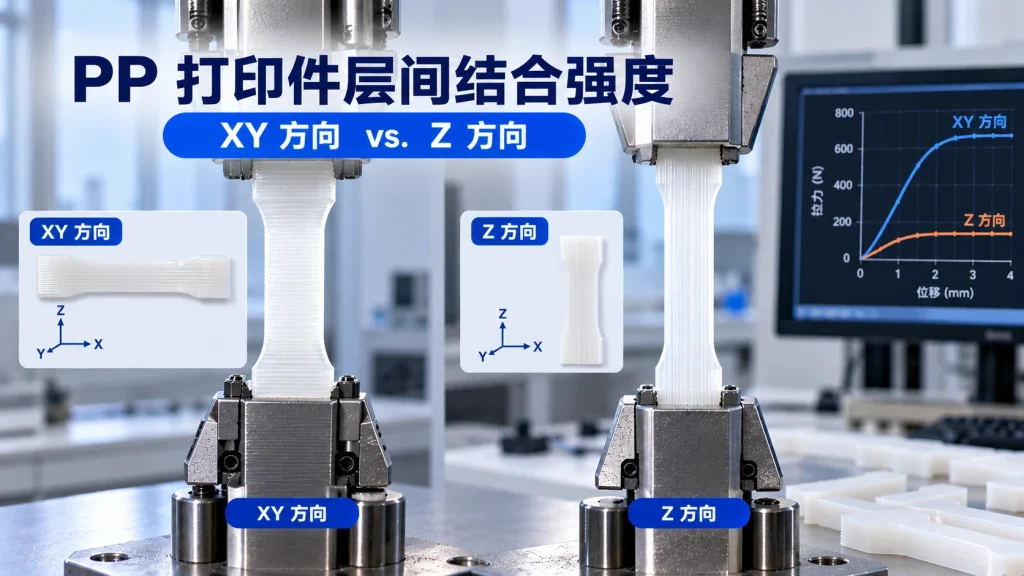
How Strong Are the Interlayer Bonds of PP Prints? How to Improve Z-Direction Strength
FDM printed parts are inherently somewhat anisotropic, so mechanical properties can differ across printing directions.
Among them,the Z direction is usually the one to watch, because Z-direction loads are more likely to act on the interface between adjacent printed layers.
PP shares this characteristic.
For PP 3D printing, one key to improving Z-direction performance is to achieve fuller, more stable fusion between adjacent printed layers, rather than simply stacking one layer of material on top of another.
How Does Interlayer Bonding Form?
During FDM printing, new molten material is extruded and deposited onto the surface of the previously printed layer.
Under ideal conditions, the freshly extruded melt applies some thermal effect to the previous layer’s surface, keeping the interfacial temperature in a range that favors material fusion.
Then molecular chain diffusion and entanglements occur between the two layers, and as the material cools, interlayer bonding is ultimately formed.
If the previous layer has cooled too quickly, or the newly extruded material cannot provide enough heat and contact time, interlayer fusion may be insufficient.
This means:
Interlayer strength depends not only on the material itself but is also closely tied to the thermal history during printing.
Key factors to watch:
- Interfacial temperature
- Melt temperature
- Contact time
- Material flowability
- Cooling rate
Several Key Factors for Improving PP Interlayer Strength
1. Printing temperature
Printing temperature affects melt flowability and interlayer fusion.
Within the material’s allowable processing range, moderately raising the nozzle temperature helps maintain sufficient melt heat, enabling fuller fusion between new and old printed layers.
But this does not mean higher is always better.
Excessively high temperature may lead to:
- Increased stringing
- Reduced surface quality
- Worse dimensional stability
- Material thermal degradation
- Other extrusion anomalies
Therefore, a more reasonable approach is to find the processing window suited to the specific PP material through temperature testing.
2. Print speed
Print speed also affects the interlayer thermal history.
If print speed is too high, the heat and fusion time received per unit area may change, affecting interlayer bonding.
Moderately reducing print speed, especially where better interlayer bonding is needed, can be one optimization direction.
However, the actual effect also depends on:
- Nozzle temperature
- Hotend melting capacity
- Floor height
- Print path
- Cooling conditions
Therefore, speed cannot be judged in isolation from other parameters.
3. Layer height
Layer height changes the geometry and heat-transfer conditions of each layer of material.
When layer height is too large, attention is needed on the contact area between single layers and the interlayer fusion state.
Therefore, when improving Z-direction performance, comparative testing across different layer heights can help find the parameter combination suited to the specific material and printer.
Lower layer height is not always better; ultimately it still requires balancing print quality, print efficiency, and actual mechanical performance.
4. Thermal environment
The printing environment temperature also affects the cooling rate during PP printing.
If the printing environment is cool or there is noticeable airflow, already-printed layers may cool rapidly, affecting the fusion of subsequent layers and the overall part’s thermal shrinkage behavior.
For larger PP prints, a stable printing environment is especially important.
Therefore, depending on the printer and part size, consider:
- Enclosed print chamber
- Reduce direct cold drafts
- Stable ambient temperature
But not all PP printing requires an enclosed chamber; the specific need depends on the material, part size, and environmental conditions.
5. Cooling strategy
The cooling fan directly affects the cooling rate of printed layers.
For PP printing, if cooling is too strong, it may rapidly cool the just-extruded material, making it harder to maintain a high interlayer interface temperature.
Therefore, when optimizing interlayer bonding, reduce unnecessary forced cooling and adjust fan strategy based on the specific material.
But completely turning off the fan is not necessarily suitable for all printing situations.
Cooling strategy still needs to balance:
interlayer fusion, surface quality, bridging ability, and dimensional stability
.
Print Orientation: Keep the Main Load Direction Away from Weak Interlayer Interfaces
If a part mainly experiences tensile or bending loads in actual use, print orientation is a very important design variable.
FDM printed parts do not have exactly the same properties in every direction.
If the main load acts directly on the interlayer interface, the risk of delamination or interlayer failure may increase.
Therefore, when designing functional parts, try to align the main load path with the filament deposition direction of the printed layers, while reducing situations where critical loads act directly on interlayer interfaces.
For example, for certain hooks, brackets, and connectors, changing the part’s placement orientation can improve how loads are borne.
But the specific best orientation depends on:
- Load direction
- Part geometry
- Print path
- Wall thickness
- Interlayer bonding
- Actual usage
So you cannot simply assume that one placement orientation is always stronger for all parts.
What If Z-Direction Loading Cannot Be Avoided?
Not all parts can solve the problem by changing print orientation.
When critical structures must bear Z-direction loads, structural design can reduce pressure on interlayer interfaces.
For example:
Increase the loaded cross-section
Increase wall thickness or local cross-sectional area to reduce stress per unit area.
Add reinforcing ribs
For brackets, enclosures, and connectors, reinforcing ribs can redirect the load-transfer path.
Optimize fillets
Avoid sharp right-angle transitions to reduce local stress concentration.
Adjust structural orientation
Sometimes you don’t need to change the whole part’s print orientation—redesigning a local structure alone can improve the load path.
Therefore,material, printing process, and structural design should be combined to address Z-direction strength issues.
How to Test PP Interlayer Strength?
One fairly intuitive method is to print tensile specimens in different orientations and compare them.
Step 1: Keep printing parameters consistent
For example, fix:
- Material
- Nozzle temperature
- Floor height
- Print speed
- Number of wall lines
- Fill rate
Only change the specimen’s print orientation.
Step 2: Perform tensile tests separately
Compare the following across specimens from different orientations:
- Maximum tensile strength
- Elongation at break
- Fracture location
- Failure mode
This makes it easier to directly observe the anisotropy introduced by print orientation.
Step 3: Observe the fracture surface
Fracture surface morphology can also provide some information.
If fracture occurs mainly along the interlayer interface, it indicates the interlayer region may be a critical weak point.
If the material shows more pronounced plastic deformation, the failure mechanism may be different.
However, fracture observation is better used as a supplementary analysis and cannot replace standardized mechanical testing on its own.
How to Compare Z and XY Directions More Accurately?
If you want meaningful comparison data, the most important thing is to control variables.
For example:
Same material + same printer + same print parameters + same specimen dimensions + different print orientations
Only then can you clearly observe the effect of print orientation itself.
At the same time, the test report should ideally record:
- Material grade
- Printer model
- Nozzle temperature
- Hotbed temperature
- Floor height
- Print speed
- Cooling settings
- Number of wall lines
- Fill rate
- Print orientation
- Testing Standards
- Test environment
Only then will the resulting data be easier to reproduce and compare.
Why Is PP’s Interlayer Strength Especially Worth Attention?
PP itself has good flexibility and toughness, but the final performance of FDM printed parts depends on more than the material alone.
For an actual PP part:
Material properties ≠ printed-part properties
The final mechanical behavior is also influenced by the microstructure formed during printing.
Especially under Z-direction loading, interlayer bonding can become a key factor determining the part’s final failure mode.
Therefore, for PP printed parts that must bear loads, merely knowing PP’s material parameters is not enough.
You also need to know:
how the part actually performs under your specific print parameters and orientation.
Summary
- FDM printed parts are anisotropic, and Z-direction performance is usually the part that needs close attention.
- The interlayer strength of PP prints depends oninterfacial temperature, melt temperature, contact time, and cooling rateand other thermal-history factors.
- Printing temperature, print speed, layer height, thermal environment, and cooling strategy can all serve as directions for optimizing interlayer bonding.
- Choosing a sensible print orientation is an important way to reduce Z-direction loading risk.
- If Z-direction loading cannot be avoided, structural design measures such as increasing cross-section, adding ribs, and using fillets can improve load distribution.
- Testing standard specimens with identical parameters but different print orientations gives a direct evaluation of a print’s anisotropy.
- For actual functional parts, consider comprehensivelymaterial, printing process, print orientation, and part structure, rather than looking only at the material’s own strength.
PP 打印件 Z 方向为什么偏弱?
FDM 本身各向异性,层与层靠熔体重新缠结结合,强度通常低于 XY 平面内的连续挤出路径。PP 的半结晶收缩让这一点更值得关注。
提升层间结合先看哪几项?
喷嘴温度、打印速度、层高、热环境和冷却策略。让上一层还保有足够热量时下一层就叠上去,同时避免局部急冷。
主受力方向避不开 Z 怎么办?
加大受力截面、增加壁厚和填充、用圆角过渡消除应力集中,必要时改变装配结构让载荷转为压应力而不是去撕层。
开放散热会不会削弱层间结合?
我们实操就是开放打印:PP 冷却要散掉大量热,空调房开门开盖更利于整体均匀定型。关键是均匀而不是保温,配合壁厚均匀和避开穿堂风,层间反而更稳。
Related Reading
- Are PP Prints Strong? How to Assess PP’s Mechanical Properties
- Does PP Printing Require an Enclosure? The Impact of Ambient Temperature on Printing
- How to Configure PP 3D Printing Settings? PPpro™ Parameter Guide
- How to Design PP Parts for 3D Printing? Wall Thickness, Fillets, Snap Fits and Warp Prevention