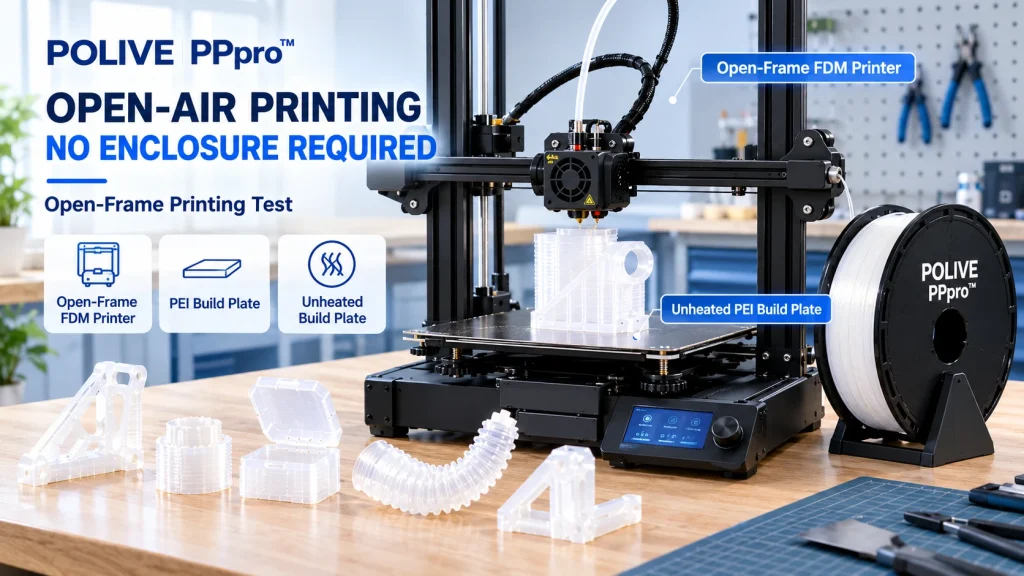
Does PP printing need an enclosure? Open-frame printing test with POLIVE PPpro™
No. PP must shed heat as it cools, so we print PPpro open-frame in an air-conditioned room with no heated bed or enclosure.
Does PP printing need an enclosure?
Not necessarily.
Traditional PP is easily affected by shrinkage and cooling conditions during FDM 3D printing, so some users consider using an enclosure to reduce the interference of external environment changes with the printing process.
But that does not mean every PP filament requires an enclosure. The actual need depends on the material formulation, model size, printer structure, and the specific printing conditions.
For POLIVE PPpro™, one important goal of the product design is to lower the printing barrier of traditional PP, so that users can run open-frame printing on common desktop FDM printers.
PPpro™’s recommended approach is open-door, open-lid printing with no heated bed, preferably in a relatively stable air-conditioned room. Rather than relying on an enclosure to hold a high ambient temperature, what matters more is whether cooling is even across different areas during printing.
Why does traditional PP warp so easily?
PP is a semi-crystalline polymer.
During FDM printing, the molten material extruded from the nozzle gradually cools and crystallizes while shrinking in volume. If different areas of the part cool at noticeably different rates and shrink to different degrees, uneven shrinkage stress can build up and lead to:
Corner lifting
bottom deformation
Size changes
increased interlayer stress
An enclosure can reduce the influence of external airflow and environmental variation to a certain extent, so for some traditional PP materials or larger parts, an enclosed environment may help improve printing stability.
But an enclosure is not the only solution. The material’s own shrinkage behavior, bed adhesion, first-layer condition, and cooling uniformity matter just as much.
For PP filaments with different material formulations, the judgment should be based on the printing method recommended for each.
Why does an enclosure raise the barrier to using PP?
For some desktop users, an enclosure may mean:
A higher printer purchase cost
A more complex equipment structure
A higher barrier to using the equipment
Some open-frame printers cannot meet these requirements directly
If a user already owns an open-frame FDM printer, buying an additional enclosed machine also raises the cost of trying a new material.
So if a PP filament can be used on an open-frame printer under suitable conditions, more users can start testing with the equipment they already have, without first buying a dedicated enclosed printer.
This is one of the barriers POLIVE PPpro™ aims to lower.
Can PPpro™ be used on an open-frame printer?
Open-frame printing is possible under suitable conditions.
Through material modification, POLIVE PPpro™ is optimized for the shrinkage, warping, and adhesion problems traditional PP faces in FDM printing. The product is positioned to support open-frame printing with a room-temperature bed.
In POLIVE’s own testing, PPpro™ has been printed on open-frame machines including the Bambu Lab A1 and Creality Ender-3.
This means users do not necessarily need to buy a dedicated enclosed printer before trying PPpro™.
That said, the printer model is only one factor. Actual print performance is still affected by the following:
Model size and geometry
Bed material and surface condition
First-layer height and extrusion condition
Nozzle temperature and print speed
Cooling fan settings
Stability of the printing environment
Cooling uniformity across different areas of the part
For particularly large models, or parts with very high dimensional-stability requirements, the result still has to be confirmed through actual printing tests.
How should PPpro™ open-frame printing be set up?
First-time PPpro™ users can start with the following directions.
| Setting | Recommendation |
| Print mode | Open door, open lid, open-frame printing |
| Heated bed | Off — print on a room-temperature bed |
| Printing environment | Prefer a relatively stable air-conditioned room |
| Nozzle temperature | Start from PPpro™’s recommended parameters |
| Print speed | Start at a moderate speed, then increase it once stable |
| First layer | Make sure lines are continuous and even, with stable adhesion |
| Cooling | Watch cooling uniformity across different areas |
| Auxiliary structure | Test a Brim if needed to improve edge adhesion |
These settings are guidance for getting started; they do not mean every printer and model will produce the same result directly.
Start with a small test model to confirm first-layer, extrusion, and cooling behavior, then move on to larger parts step by step.
Why does open-door, open-lid printing better match PPpro™’s positioning?
With traditional PP, some users use an enclosure to reduce environmental variation, especially when printing large parts that are prone to shrinkage.
But for POLIVE PPpro™, the product is not positioned to rely on an enclosure to maintain a specific printing environment. Instead, it lowers printing difficulty through material modification and supports open-frame printing.
So it is best to try the following first:
Open door, open lid: Use the machine in open-frame mode; there is no need to add an enclosure by default.
Air-conditioned room: Choose a relatively stable indoor environment to reduce obvious fluctuations.
Even cooling: Watch the cooling differences between areas of the part instead of simply chasing a higher ambient temperature.
Reasonable print parameters: Follow the recommended settings for the material and adjust nozzle temperature, speed, and fan step by step.
Note that open-door, open-lid printing does not mean environmental conditions no longer matter. Airflow around the printer, changes in the room, and the structure of the model itself still affect the result.
Why is printing in an air-conditioned room recommended?
For PP 3D printing, environmental stability and cooling uniformity deserve attention.
An air-conditioned room provides a relatively stable indoor environment, which makes it a suitable first-choice test environment for PPpro™ open-frame printing.
The point here is not to hold the printing environment at some fixed high temperature, but to minimize obvious environmental changes during printing.
Pay particular attention to the following:
Whether the indoor environment stays relatively stable during printing
Whether different areas of the model show obvious cooling differences
Whether large flat bottoms or long edges tend to lift more easily
Whether thin walls, thick walls, and sharp corners deform to different degrees
Note that an air-conditioned room does not mean the air should blow directly at the printer. For any FDM material, cooling differences caused by local airflow can affect the result.
If some areas are clearly cooling unevenly, observe the environment and the model first, then decide whether to adjust the fan or other parameters.
The core principle is to keep cooling even, not to chase a higher ambient temperature or a slower cooling rate.
Can PPpro™ be printed on a PEI sheet?
It can be tested, but actual performance depends on the type and condition of the PEI surface and on the specific printing conditions.
PEI is a common FDM build-plate material, but different surface treatments may give different adhesion. PP is itself a low-surface-energy material, so you cannot simply assume every PEI plate will give the same adhesion.
When testing, pay attention to:
Whether the build plate is clean
Whether first-layer lines are continuous and even
Whether the first layer can adhere stably
Whether edges lift during printing
Whether the part is easy to remove after printing
For PPpro™, verify with the heated bed off and the bed at room temperature. If you change the build plate or the printer, check the first layer again rather than copying the previous settings directly.
Does PPpro™ need glue?
Whether glue is needed depends on the build plate, its surface condition, and the actual printing conditions.
On a suitable PEI surface with suitable parameters, you can test how PPpro™ prints without additional glue.
But that does not mean no build plate ever needs auxiliary treatment.
Bed material, surface condition, model size, and first-layer parameters all affect adhesion. So rather than saying flatly that “PPpro™ never needs glue,” the more accurate statement is:
On a suitable build plate and under suitable printing conditions, PPpro™ can be tested without additional glue.
If first-layer adhesion is insufficient, check bed cleanliness, first-layer height, and surface compatibility first, then decide whether other aids are needed.
Open-frame printing does not mean every model behaves the same
This is one point to keep in mind when using PPpro™.
Small functional parts and large flat parts can differ greatly in their printing conditions.
For example:
Small parts
Shorter print time
Easier to observe and verify the first layer
Usually a good way to confirm basic print parameters first
Large parts
Longer print time
Shrinkage may accumulate more noticeably
More sensitive to bed adhesion and cooling uniformity
Greater need to watch long edges, large flat bottoms, and sharp corners
So PPpro™ supporting open-frame printing does not mean that any size and any structure will print stably in any environment.
For large models, improve printing stability by starting with the following:
Confirm the bed material suits PPpro™
Optimize first-layer height and adhesion
Choose a relatively stable air-conditioned room
Check whether cooling is even across areas
Add a Brim if needed
Adjust model orientation and geometry
Refine print parameters step by step through small-scale tests
These methods help locate the problem instead of simply relying on an enclosure or a single temperature setting.
What is PPpro™’s real breakthrough?
PP itself is not a new material.
For a long time, one of the main challenges in FDM 3D printing of PP has been making the material extrude, adhere, and cool reliably — not merely making it melt when heated.
One focus of POLIVE PPpro™’s material design is improving how traditional PP performs in the following chain:
Material shrinkage → bed adhesion → cooling uniformity → printing stability
So the value of PPpro™ is not a simple claim that “no PP needs an enclosure.” It is that, under suitable conditions, users can start trying PP on common open-frame FDM printers.
Open-door, open-lid printing, room-temperature bed conditions, and an air-conditioned room are all important parts of PPpro™’s current product positioning. Actual print results still need to be verified against the machine, the model, and the parameters.
Conclusion: What printing environment suits PPpro™ best?
PP 3D printing does not necessarily require an enclosure. Traditional PP is fairly sensitive to cooling shrinkage and environmental conditions, so an enclosed environment may help some materials or large parts — but it cannot be treated as a requirement for all PP materials.
For POLIVE PPpro™, the recommended approach is:
Open door, open lid: No need for an enclosure by default.
Room-temperature bed: Turn the heated bed off and print as the product recommends.
Air-conditioned room: Prefer a relatively stable indoor environment.
Even cooling: Watch for cooling differences across areas of the part.
Suitable bed and first layer: Confirm stable first-layer adhesion, then test larger models step by step.
PPpro™ aims to lower the printing barrier of PP, so users can start trying PP on common open-frame desktop FDM printers.
For small and medium functional parts, open-frame printing can be a lower-barrier way to work; for large or high-precision parts, verify further against model structure, bed adhesion, and cooling behavior.
In the end, whether a printing environment is suitable should be judged by actual print results.Rather than relying on an enclosure to hold a high temperature, start with the material itself, bed adhesion, and cooling uniformity to find the conditions that suit the current model.
PP 打印需要封闭仓吗?
不需要,我们实际打印既不封箱、也不加热床。PP 冷却要吸收并散掉大量热,封闭仓反而把热量困住;在空调房里开门开盖、用开放机架,散热更快、定型更稳。
传统 PP 容易翘边,封箱不是常识做法吗?
常规 PP 半结晶、收缩大,靠封箱保温减缓温差是常见思路;但那套做法针对的是普通 PP。改性 PPpro™ 配合开放式散热和平台方案走的是另一条路,不用照搬常规 PP 的参数。
开放式打印首层怎么粘得住?
加裙边,再在平台上薄涂 PPLOCK26811 专用胶水,等几分钟干透后直接打印。一次涂抹可多次打印,要清洁用酒精擦就行,不靠热床温度去粘。
模型设计上能做什么来防翘边?
直角改圆角、底部加厚做老鼠耳朵、增大底部接触面积、壁厚尽量均匀。这些手段比调温度更能从根源上减小收缩应力。
入门开放机器能打吗?
能,我们在 Bambu A1 上已经打了很多模型。关键是把散热、粘附和设计三件事按上面的方式配好,而不是去加封箱或换高端机器。
Related Reading
POLIVE PPpro™ 是怎么做出来的?改性 PP 线材的三大技术难点
为什么 PP 3D 打印这么难?PP 打印常见问题解析
PP 3D 打印参数怎么设置?PPpro™ 新手参数指南
Does PP Printing Need a Heat Bed? Room-Temperature Printing and Cooling Setup
How to Prevent PP Warping? How to Choose Between Brim, Raft, and Skirt
What Print Bed Should Be Used for PP 3D Printing? A Comparison of Common Bed Materials