Does PP Printing Need a Heat Bed? Room-Temperature Printing and Cooling Setup
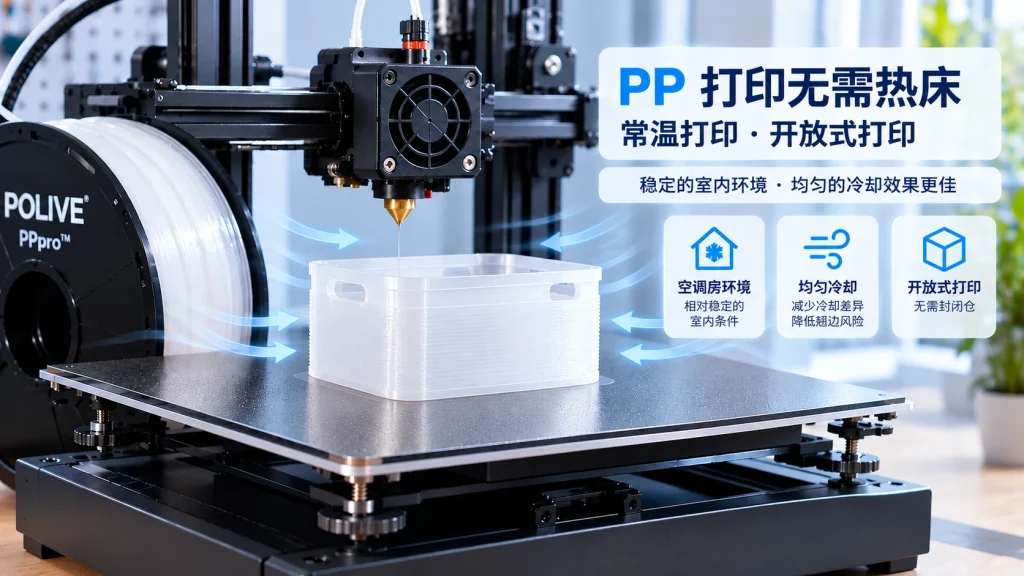
No. PPpro prints at room-temperature bed settings on an open-frame A1: PP must release heat as it cools, so bed heat works against us.
Does PP Printing Need a Heat Bed?
Whether PP 3D printing requires a heat bed depends on the specific material formulation, printer, and process requirements. Printing conditions can vary significantly between different PP filaments, so it is incorrect to assume that all PP must use a heat bed.
For POLIVE PPproâ¢, the product positioning isroom-temperature printing, no heat bed required, and open-frame printing. When using it, there is no need to heat the bed specifically for printing PPproâ¢; the focus should be on bed adhesion, first-layer condition, and cooling uniformity during printing.
So, without a heat bed, how can warping in PP printing be reduced?
The key is not simply raising or lowering a single temperature, but understanding how the material changes during printing and cooling, and controlling the factors that may affect print stability.
Why do some PP prints need a heat bed?
PP is a semi-crystalline polymer. During printing, the molten material is deposited onto the bed and then gradually cools and shrinks.
If cooling rates differ significantly across different regions of a part, uneven shrinkage stress can develop. When this stress exceeds the adhesion between the part and the bed, the corners may gradually lift.
A heat bed can change the cooling conditions at the bottom of a print, so some PP filaments list a heated bed as part of their recommended printing setup.
However, it is important to note thata heat bed is only one variable affecting print results, and not the only solution to PP warping.
PP print performance is also related to the following factors:
Material formulation and its shrinkage characteristics
Adhesion between the build surface and the material
First-layer height and extrusion condition
Part size and geometry
Printing environment and cooling uniformity
Therefore, before deciding whether PP needs a heat bed, you should first confirm the recommended printing method for the specific filament.
For POLIVE PPproâ¢, you should follow its positioning of room-temperature printing with no heat bed required, rather than directly applying the heat-bed parameters of other PP filaments.
What does room-temperature printing mean?
Room-temperature printing means the print bed does not need to be actively heated by a heat bed during printing; it does not mean the nozzle also operates at room temperature.
FDM 3D printing still requires heating the filament to a state suitable for extrusion and interlayer fusion. Room-temperature printing mainly describes the bed usage condition.
For POLIVE PPproâ¢, room-temperature printing means:
No heat bed required: There is no need to rely on a heated bed to maintain printing conditions.
Open-frame printing: In line with the product positioning, it can be used in an open-frame printing environment, without the default need for an enclosure.
Pay attention to environmental stability: A relatively stable indoor environment helps reduce fluctuations in external conditions.
Maintain cooling uniformity: Minimize excessive cooling differences between different regions of the part.
This does not mean the same print results can be achieved in any environment. Material, bed, model structure, and equipment condition still affect the final outcome.
Without a heat bed, how can PP print warping be reduced?
For print setups that do not require a heat bed, bed adhesion and cooling control deserve special attention.
1. Choose a suitable print bed
PP is a low-surface-energy material, and its direct adhesion on some common beds may be insufficient.
Therefore, when choosing a bed, you should not only look at whether it is flat, but also consider whether the first layer can adhere stably and whether the part is easy to remove after printing.
You can test the following options based on your actual equipment and material:
| Bed option | Key features | What to test |
| Bare glass | Flat surface, easy to clean | Whether PP’s direct adhesion is sufficient |
| PEI | Common general-purpose print surface | First-layer stability and part removal |
| Specialized tape | Low cost, easy to replace | Adhesion consistency and durability |
| PP sheet or PP printing sticker film | Worth testing specifically for PP material | Adhesion during printing and demolding after printing |
| Suitable surface aids | Can be used to improve adhesion on existing beds | Compatibility with material and bed |
The actual effect of different beds may vary due to material formulation, surface condition, and printing conditions, so you cannot judge their quality solely by the bed name.
For POLIVE PPproâ¢, it is recommended to first verify bed adhesion with small test prints, then gradually try larger models.
2. Check first-layer height and extrusion condition
The first layer is the foundation for the entire print to establish adhesion with the bed.
If the distance between the nozzle and the bed is too large, the extruded filament may not spread sufficiently, leading to insufficient contact area. If the first layer is over-compressed, issues such as blobbing or uneven surfaces may also occur.
It is recommended to check whether the first layer has the following characteristics:
Lines are continuous, with no obvious breaks or gaps
Good contact between lines
Even spreading
No obvious gaps or over-extrusion
If the first layer itself tends to detach, you should first check bed cleanliness, first-layer height, and extrusion condition, rather than immediately adding other auxiliary structures.
3. Print in a relatively stable environment such as an air-conditioned room
For POLIVE PPproâ¢, it is recommended to prioritize a relatively stable indoor environment, such as an air-conditioned room.
The key here is not to pursue a fixed room-temperature value, but to reduce significant environmental fluctuations during printing.
Key factors to watch:
Whether the printing area’s environment is relatively stable
Whether noticeable local cooling differences occur during printing
Whether the edges of large parts are more prone to lifting
Whether regions of different thickness show obvious deformation differences
An air-conditioned room can provide a relatively stable indoor environment, but the actual effect still depends on room conditions and airflow distribution.
4. Maintain cooling uniformity
For PP printing, cooling speed and cooling uniformity are two related but distinct concepts.
Cooling speed affects how the material cools from a high-temperature state, while cooling uniformity concerns the cooling differences between different regions of the part.
When the cooling rates of a part’s edges, center, thin walls, and thick walls differ significantly, uneven shrinkage stress may develop, increasing the risk of warping or deformation.
Therefore, when using POLIVE PPproâ¢, you should focus on:
Whether there are obvious cooling differences between regions
Whether large flat bottoms and long edges are prone to lifting
Whether thin walls, sharp corners, and similar areas are more prone to deformation
Whether the print fan settings affect the first layer and interlayer bonding
If warping occurs, do not assume that slower cooling is always better, nor that a higher ambient temperature is needed by default. A more reasonable approach is to combine actual printing observations to determine whether there is uneven cooling or insufficient adhesion.
5. Adjust the cooling fan based on actual performance
The cooling fan affects the heat dissipation rate of the extruded material, so fan settings are also worth checking.
If cooling is too fast at the beginning of printing, it may affect first-layer stability; however, whether the fan settings are appropriate also depends on the specific material and print structure.
You can observe through small-scale testing:
Whether the first layer can adhere stably
Whether corners lift
Whether interlayer bonding is stable
Whether thin walls and details are well preserved
Whether obvious deformation differences exist between regions
When testing each time, try to adjust only one major variable. This makes it easier to judge whether the fan settings truly improved the print result.
Are Brim and Raft still useful when printing without a heat bed?
Yes. Not needing a heat bed does not mean auxiliary structures are unnecessary.
The main role of Brim and Raft is to improve the adhesion conditions between the print and the bed, rather than replacing heat-bed heating.
Brim: the preferred auxiliary structure
A Brim is one or more rings of lines extending outward around the bottom of the model and connected to it.
It can increase the effective contact area between the model and the bed, reducing the likelihood of corners detaching from the bed during printing.
For models prone to warping, you can first try a Brim, then adjust the width based on the print result.
Raft: for more difficult printing scenarios
A Raft is an additional base printed below the model, on which the model is built.
It may help some models with poor bed conditions or difficult geometry, but it also increases material consumption, print time, and post-processing work.
Therefore, it is recommended to first confirm the bed and first-layer condition, then consider whether a Raft is needed, rather than using the most complex auxiliary structure from the start.
Skirt: mainly used to check the first layer
A Skirt only prints lines around the model’s perimeter and is not connected to it, so it basically does not increase the model’s own adhesion area.
It is more suitable for checking whether extrusion is stable and whether the first-layer height is reasonable, rather than serving as the main anti-warping measure.
If warping occurs in PP printing, in what order should you troubleshoot?
If warping occurs when using POLIVE PPproâ¢, you can check in the following order.
| Troubleshooting order | Items to check | Key observations |
| 1 | Bed surface | Whether it is clean and suitable for PP |
| 2 | First-layer condition | Whether lines are continuous and even, and adhesion is stable |
| 3 | Environmental conditions | Whether the indoor environment is relatively stable |
| 4 | Cooling uniformity | Whether obvious cooling differences appear between regions |
| 5 | Auxiliary structure | Whether to add a Brim |
| 6 | Model structure | Whether large flat bottoms, sharp corners, and long edges are prone to deformation |
| 7 | Other printing parameters | Whether fan, print speed, and extrusion settings are appropriate |
This troubleshooting order can help you locate problems step by step, rather than changing multiple parameters at once.
If the bed itself has insufficient adhesion, simply adjusting cooling settings may not solve the problem; if the first layer is in good condition but large parts still warp, you need to further check the model structure and cooling uniformity.
Can all PP filaments be printed at room temperature without a heat bed?
This cannot be generalized.
There may be differences between PP filaments in formulation, crystallization behavior, shrinkage characteristics, and processing performance. Some products may require specific heat-bed conditions or other equipment settings, while others adopt different printing approaches.
Therefore, when selecting printing parameters, you should prioritize the technical documentation of the specific product, rather than judging solely based on the material name “PP”.
For POLIVE PPproâ¢, its product positioning is room-temperature printing, no heat bed required, and open-frame printing. Users should print according to the product’s recommended parameters and confirm bed adhesion, first-layer condition, and cooling performance through actual testing.
If you are using PP filament from another brand, you should follow that product’s recommended conditions and not directly copy PPpro⢒s printing method.
Summary
Whether PP printing requires a heat bed depends on the specific filament’s formulation and recommended process; there is no single answer that applies to all PP materials.
For POLIVE PPproâ¢, keep the following points in mind:
No heat bed required: Following PPpro⢒s product positioning, you can print under room-temperature bed conditions.
Open-frame printing: There is no default need to use an enclosure.
Bed adhesion matters: You should choose a suitable print surface and check the first-layer condition.
Environmental stability deserves attention: A relatively stable indoor environment such as an air-conditioned room can be a priority choice.
Cooling uniformity is the focus: Pay attention to cooling differences between different regions of the part.
Brim can serve as an aid: For models prone to warping, you can improve by increasing the effective adhesion area.
Do not rely on a single parameter alone: The bed, first layer, environment, cooling, and model structure can all affect the final result.
Follow the specific material: The printing requirements of other PP filaments may differ from those of PPproâ¢.
Instead of searching for a fixed heat-bed temperature that works for all PP, it is better to first clarify the material’s printing requirements, then start from bed adhesion, first-layer setup, and uniform cooling to gradually find a printing approach suitable for your current equipment and model.
打 PP 一定要开热床吗?
我们实际打印不用热床,也不用封箱。PP 冷却要吸收并散掉大量热,空调房里开放机架、开门开盖散热更快,定型反而更稳;热床并不是粘住首层的必要条件。
常温打印具体靠什么防翘边?
三件事一起做:平台薄涂 PPLOCK26811 等干透后加裙边;模型底部直角改圆角、加厚老鼠耳朵、增大接触面积、壁厚均匀;环境保持空调房稳定、避开穿堂风。
不用热床,散热和风扇怎么把握?
关键是均匀而不是猛吹。让零件整体同步降温,避免一侧被风直吹造成局部收缩差;开放环境本来就更利于散热,不需要靠封箱保温去压温差。
所有 PP 线材都能这么打吗?
不能,这取决于配方。PPpro™ 是按常温开放打印设计的,普通 PP 常要靠热床和封箱;换料时请按该线材的出厂说明重新确认,别把我们的参数套到别的料上。
Related Reading
What Is Polypropylene (PP)? PP for 3D Printing from a Materials Perspective
Is PP a Semi-Crystalline Material? What Crystallinity Means for 3D Printing
What Print Bed Should Be Used for PP 3D Printing? A Comparison of Common Bed Materials
How to Prevent PP Warping? How to Choose Between Brim, Raft, and Skirt
What Is PP’s Melting Point? How Should PP Printing Temperature Be Understood
How to Configure PP 3D Printing Settings? PPpro™ Parameter Guide