What to Do When PP Printing Jams? Troubleshooting Steps for Poor Extrusion
PP clogs usually trace to heat creep or uneven extrusion, not the filament. Check hotend cooling, retraction and nozzle cleanliness first.
Common Causes at a Glance
When PP printing shows poor extrusion, there is usually more than one cause.
Common situations include the following categories.
1. Foreign objects or material residue
Inside the nozzle, residue may remain:
- Other material used in the previous print
- Residue formed by prolonged heating
- Dust or other foreign objects
Especially when switching frequently between different materials, if purging is insufficient, residual material may affect the normal extrusion of subsequent PP.
2. Low temperature
If the nozzle’s actual temperature is insufficient to keep the material in a stable flow state, melt flow resistance may increase.
In this case, the following may appear:
- Insufficient extrusion volume
- Intermittent extrusion
- Extruder skipping (gear slipping)
- Missing material between layers
If the problem becomes more obvious after increasing print speed, also consider whether the hotend’s melting capacity can meet the higher material flow.
3. Poor hotend cooling
Another common issue is heat creep..
If the cooling system above the hotend malfunctions, heat may spread upward along the hotend, prematurely softening the filament in the feed zone.
This can lead to:
The filament softens where it shouldn’t → feed resistance increases → extrusion becomes unstable.
Therefore, if extrusion problems occur, also check the cooling fan and heatsink condition.
4. Filament slipping
Sometimes the real problem isn’t the nozzle at all, but the filament feed mechanism.
For example:
- Worn extruder gear
- Improper idler wheel pressure
- Large amount of filament dust accumulated on the gear
- Abnormal filament diameter
- Filament crushed or deformed
All of these can cause the extruder to fail to push enough material steadily toward the hotend.
If you see the extruder gear repeatedly ‘clicking’ and skipping, check the feed mechanism first.
5. Problems with the filament itself
The filament’s condition can also cause feed anomalies.
For example:
- Obviously deformed filament
- Filament spool sticking together
- Contaminated filament
- Filament tangled on the spool
- Local abnormal filament diameter
In this case, even if the nozzle itself isn’t clogged, the feeding process may encounter abnormal resistance.
6. Speed and flow mismatch
After increasing print speed, the amount of material that must be melted and extruded per unit time also increases.
If the required flow exceeds the hotend’s actual melting capacity, the following may appear:
Speed increases → material supply demand rises → the hotend can’t melt in time → insufficient extrusion
Therefore, if extrusion problems only appear at higher print speeds, don’t check only the nozzle—also check whether print speed, flow, nozzle temperature, and hotend capacity are properly matched.
How to Troubleshoot PP Print Jams?
Step 1: Observe the symptoms first
First observe where the problem occurs.
| Symptom | Priority check direction |
| Extruder keeps skipping | Feed mechanism, feed resistance |
| Gear shows obvious dust | Filament or feed mechanism |
| No material extruding at all | Hotend, nozzle, feeding |
| Intermittent extrusion | Temperature, feeding, local clog |
| Normal at low speed, abnormal at high speed | Temperature, flow, hotend melting capacity |
| Gradually unable to extrude after printing for a while | Hotend cooling, heat creep, clog |
Don’t conclude ‘the nozzle is clogged’ based on a single symptom.
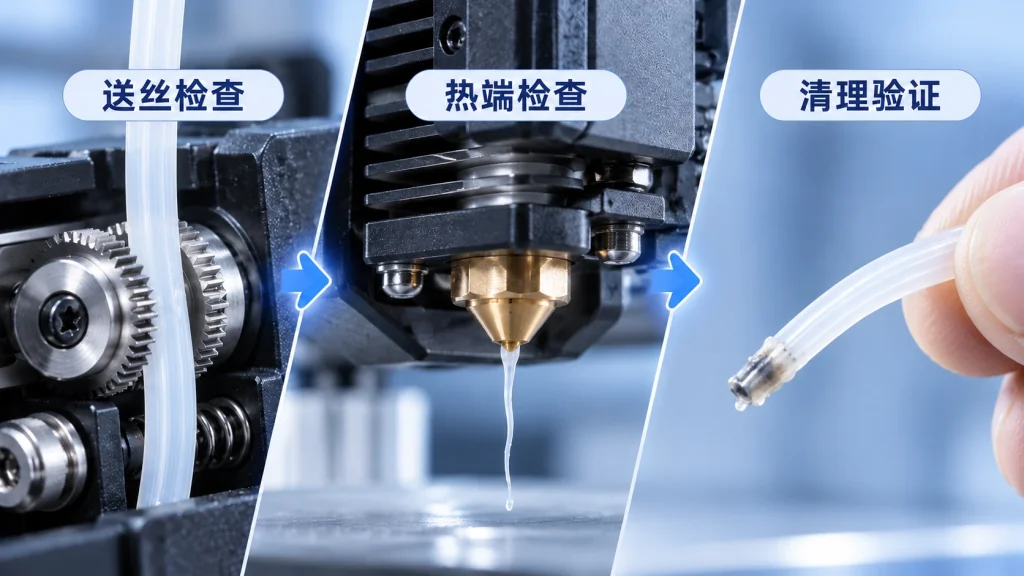
Step 2: Check the feed mechanism
First inspect the extruder.
You can:
- Loosen the idler wheel.
- Check whether the extruder gear has obvious filament dust.
- Check whether the idler pressure is appropriate.
- Check whether the filament has obvious bite marks.
- Cut off a section of filament severely bitten by the gear.
- Re-feed and observe the resistance.
If the feed mechanism itself has a problem, cleaning the nozzle directly may not solve it.
Step 3: Check temperature and cooling
Confirm that the nozzle temperature shown by the printer is stable.
Also check:
- Whether the hotend cooling fan works properly
- Whether the heatsink is dusty
- Whether the air intake is blocked by dust
- Whether heating is stable
If the equipment allows, you can also use a suitable temperature-measuring tool to further verify the actual temperature.
Note that different measuring tools may have errors when measuring small metal nozzles, so measured values are better used as auxiliary judgment rather than the sole basis.
Step 4: Clean the hotend
If you’ve confirmed the problem is more likely from the nozzle or hotend, you can try cleaning.
First, heat the hotend within the temperature range suitable for the material, then try manually pushing clean filament.
If the material extrudes smoothly, the clog may not be severe.
If there is still obvious resistance, depending on the printer and nozzle structure, you can try using cold pull and other cleaning methods.
The basic idea is:
Heat up → push in clean filament → drop to a temperature suitable for cold pull → pull the filament out
If done correctly, the end of the pulled-out filament may carry out some residue from inside the nozzle or hotend.
For stubborn clogs, you may need to disassemble the nozzle or hotend for further cleaning per the printer manufacturer’s maintenance method, and replace related parts if necessary.
**Image suggestion:** 16:9 landscape, a two-step comparison. Left shows pushing clean filament into the heated hotend; right shows the filament end after cold pull, with a small amount of residue visible. Focus on the operation process; don’t add exaggerated clogging effects.
Step 5: Reinstall and test
After cleaning, don’t start a large print immediately.
It’s recommended to first do a short low-speed extrusion or print test, and observe:
- Whether extrusion is continuous
- Whether line width is stable
- Whether obvious missing material appears on the surface
- Whether there is still abnormal skipping
- Whether the hotend temperature is stable
After confirming extrusion has returned to normal, resume formal printing.
What to Watch Out for After a PP Jam?
When cleaning the nozzle, we don’t recommend forcibly disassembling the hotend without understanding the printer structure.
Different printers have different nozzle, throat, and hotend structures; specific disassembly and maintenance methods should follow the equipment manufacturer’s instructions.
Pay special attention to high-temperature components.
The nozzle and hotend reach very high temperatures during operation; avoid direct contact with hot metal parts during cleaning.
If you need to remove the nozzle or hotend, first confirm the correct maintenance steps for the equipment.
How to Reduce Recurring PP Jams?
1. Purge thoroughly when changing materials
When changing materials, purge in a way allowed by the equipment and material to minimize residue of different materials inside the hotend.
Especially when switching between different materials, don’t assume the nozzle interior is already completely clean.
2. Keep filament and printer clean
Dust, oil, and other contaminants on the filament surface may enter the feed path and hotend.
Therefore, besides storing filament properly, also clean regularly:
- Extruder gear
- Heatsink
- Fan
- Feed path
3. Don’t keep the nozzle temperature at the low edge
If you’ve confirmed the current low temperature causes unstable extrusion, adjust appropriately within the material’s recommended range.
Especially after increasing print speed, if extrusion becomes unstable, re-evaluate temperature and flow together.
Don’t simply think ‘higher temperature is always better’.
Excessively high temperature can also bring stringing, material degradation, or other printing problems.
4. Don’t force-feed when clogged
If the hotend is already clearly clogged, continuing to push filament hard doesn’t guarantee solving the problem.
Excessive mechanical pressure may further deform the filament and increase the burden on the feed mechanism and hotend.
A more reasonable approach is to first determine the clog location, then use a suitable cleaning method.
5. Prepare common spare parts
For users who print frequently, prepare some common spare parts based on the printer model, such as:
- Nozzle
- Throat (heat break)
- Hotend-related seals
When the nozzle is indeed damaged or clogged beyond effective cleaning, replacing it directly is often more time-saving than repeated handling.
Is PPpro™ More Prone to Jamming?
You can’t simply judge jam probability from the three words ‘PP material.’
Actual extrusion stability is also affected by:
- Material formulation
- Nozzle temperature
- Print speed
- Flow rate
- Hotend structure
- Feed system
- Filament condition
- Printer maintenance status
and other factors.
Therefore, rather than claiming ‘never jams’ or ‘never cokes,’ it’s better to demonstrate through actual test data the extrusion stability of POLIVE PPpro™ under specific printing conditions.
If there is subsequent test data from long-term printing, continuous extrusion, or different print speeds, it can be further added to the article as practical evidence.
Summary
When PP printing shows poor extrusion, first don’t rush to disassemble the nozzle.
Follow this order:
1. Observe symptoms → 2. Check feeding → 3. Check temperature and cooling → 4. Clean hotend → 5. Low-speed test
Also distinguish:
- Feed slippingdoes not equal nozzle clogging
- Insufficient temperaturedoes not equal hotend clogging
- Insufficient extrusion at high speeddoes not necessarily mean foreign objects in the nozzle
Only by finding the real cause can you avoid repeatedly cleaning the nozzle without solving the problem.
For PP 3D printing, keeping the filament clean, the feed mechanism normal, and hotend cooling stable, and adjusting temperature and flow based on material and print speed, are important foundations for reducing extrusion problems.
PP 打印挤出不畅,先查哪几项?
按顺序:喷嘴是否有异物或残料、温度是否偏低、热端散热是否不良、送线是否打滑、线材本身有无问题、速度与流量是否不匹配。多数堵头是这几项叠加。
怎么减少反复堵头?
换料时做好清理、避免长时间高温空烧、保持线材表面干净、喷嘴到了寿命就换;另外别用过高温度去硬顶流量,PP 对热降解比较敏感。
PPpro™ 更容易堵头吗?
低翘改性 PP 不含磨蚀性增强填料,对喷嘴更友好;按常温开放打印的设定走,通常比反复调高温去追求粘附更不容易积料。
清理完喷嘴要重新做什么?
重新确认首层高度和流量、校准挤出,并用小件试打确认出丝连续。别一上来就打大底板,浪费时间也容易掩盖问题。
Related Reading
- What Nozzle Should Be Used for PP Printing? Nozzle Wear and Material Selection
- How to Store PP Filament? Drying, Sealing, and Everyday-Use Tips
- What Print Speed Should Be Set for PP? The Impact of Speed on Print Quality
- 为什么 PP 以前这么难打?收缩、翘边、粘不住的三大难题