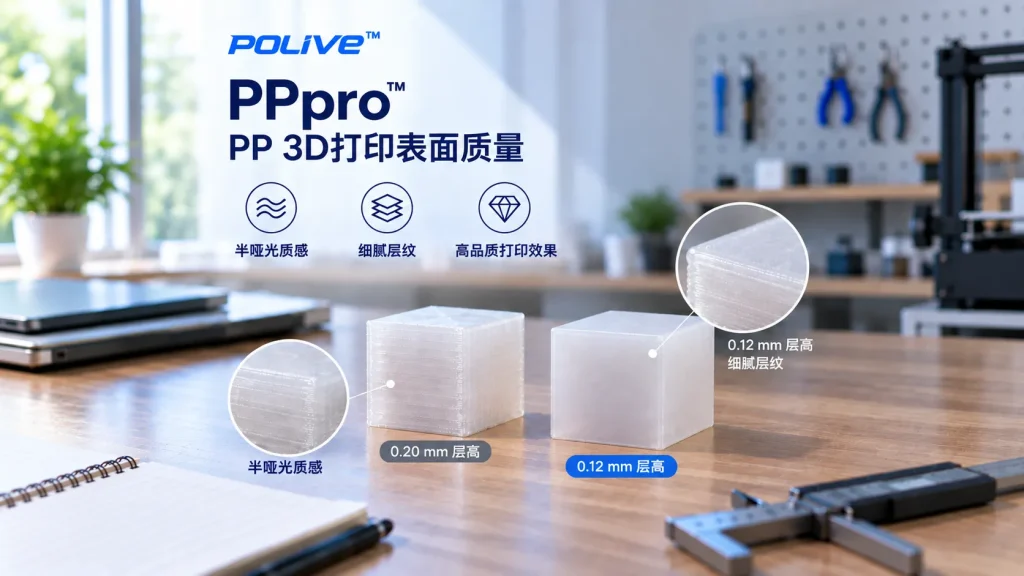
How Good Is the Surface Quality of PP Prints?
When many people think of engineering plastics, their first impression may be:isn’t the printed part very rough?
In reality, PP 3D printed parts can also achieve a fairly fine, smooth surface finish.
With appropriate printing parameters,POLIVE PPpro™ prints can have softened layer lines, a relatively smooth surface feel, and a natural semi-matte texture.
Of course, the final surface result depends not only on the material itself but also on factors such as print temperature, layer height, print speed, cooling, nozzle size, and model structure.
Why do PP prints show a semi-matte texture?
PP is asemi-crystalline polymer.
Compared with some high-gloss PLA prints, PP prints usually do not show a very strong mirror-like sheen. Under suitable printing conditions, PPpro™ can present a relatively naturalsemi-matte appearance.
This surface effect has several characteristics:
- the gloss is not overly strong
- visually relatively soft
- it is less prone to a very obvious plastic highlight
- suitable for some industrial and functional product appearances
However, it should be noted thatPP’s surface gloss is not fixed.
material formulation, color, print temperature, layer height, cooling rate, and the printed model itself can all affect the final surface result.
So a more accurate statement is:PPpro™ can present a fine, semi-matte surface under suitable printing conditions.
How to make PP prints even finer?
To further reduce layer lines and improve surface fineness, you can start with several parameters.
1. Lower the layer height
The lower the layer height, the smaller the visual step between individual layers usually is, making curved surfaces and walls look smoother.
For example, you can try:
0.12 mm layer height
Compared with 0.20 mm, 0.12 mm usually further reduces the visual presence of layer lines.
Of course, lowering the layer height also increases print time accordingly.
2. Appropriately lower the print speed
Print speed also affects extrusion stability and the final surface quality.
If the main goal is to test the surface effect, you can try:
about 40 mm/s
as a starting value.
The actual optimal speed still needs to be adjusted based on the printer, nozzle size, model structure, and temperature.
3. Use a heat gun for surface treatment
For some PP prints, you can usecontrolled heatingto slightly soften the surface material, thereby reducing the visual effect of fine layer lines.
You can use a heat gun to quickly and evenly sweep across the printed surface.
But here special attention is needed:
Do not concentrate heating on one area for a long time.
Excessively high temperature or overly long heating time may cause:
- excessive surface softening
- local deformation
- changes in gloss
- loss of detail
Therefore, it is recommended to try it on a test part first, then apply it to the final product.
Can PP surfaces be used directly?
Yes.
If you do not need painting, coating, or adhesives, PPpro™ prints can be used directly as the final appearance.
Its semi-matte texture is presented without any additional surface treatment.
But if subsequentspraying, bonding, or surface coatingis needed, you must consider an important property of PP:
PP has low surface energy.
This means traditional coatings and adhesives may adhere poorly to PP surfaces.
Depending on the application, you can consider:
- Flame treatment
- Plasma treatment
- a suitable primer
- adhesives designed for low-surface-energy plastics
The specific treatment method must be determined based on the coating, glue, and actual application environment used.
What is the difference in surface effect between PP and PLA?
One important reason PLA is popular is that it is easy to print and can achieve good surface results.
PP’s characteristics are different.
Rather than simply judging which material has a “better surface,” it is better to choose based on actual needs.
PLA:
is more suitable for applications that value printability, detail, and decorative effect.
PP:
in addition to a relatively fine surface, also has low density, chemical resistance, flexibility, and fatigue resistance, making it more suitable for some functional parts.
This is also where PPpro™’s value lies:
it cares not only about whether the print looks good, but also about whether the print can truly be used in real applications.
What factors determine the surface quality of PP prints?
The final surface result of PP 3D printing can be seen as the combined effect of multiple factors:
material → nozzle temperature → layer height → print speed → cooling → model structure → post-processing
Therefore, even with the same PP filament, different printing parameters can yield completely different surface results.
If your goal is a better appearance, first establish stable printing parameters, then targetlayer height and print speedfor adjustment.
POLIVE PPpro™’s surface performance
PPpro™ is a modified PP filament developed by POLIVE for FDM 3D printing.
Beyond improving the warping, adhesion, and print-stability problems that traditional PP easily encounters during printing, we also focus on the final real-world performance of the printed part.
Under suitable printing conditions, PPpro™ prints can show:
- a relatively smooth surface
- inconspicuous layer lines
- a natural semi-matte texture
- appearance suitable for functional products
If you want to further improve surface fineness, you can start with 0.12 mm layer height, about 40 mm/s print speed, and controlled heat treatmentand test in these directions.
Summary
PP 3D printed parts are not necessarily rough.
Under suitable printing conditions,POLIVE PPpro™ can present a relatively smooth surface and a natural semi-matte texture.
Want to further reduce layer lines? You can try:
- 0.12 mm layer height
- about 40 mm/s print speed
- for testing.
These parameters should serve as starting points for testing, not as fixed standards applicable to all printers and models.
For those who care about bothappearance and texture, and also needmaterial propertiesfunctional parts, PPpro™ provides a choice different from traditional PLA.
PP 打印件的表面是什么质感?
偏半哑光,不是 PLA 那种亮面。PP 表面能低、结晶行为不同,挤出后形成柔和的漫反射质感,做功能件时不太显层纹。
想让 PP 表面更细腻,从哪几方面调?
降低层高、适当放慢打印速度、必要时做表面热处理;但更根本的是零件设计——壁厚均匀、圆角过渡能减少因收缩造成的表面凹凸。
半哑光表面是缺点吗?
看用途。外观展示件可能想要更亮,功能件反而受益:不显指纹、不显轻微层纹,而且 PP 表面能低、不容易沾污、耐化学擦拭,代价是涂装和胶粘要专门处理。
Related Reading
·How Much Force Can PP Printed Parts Withstand? Toughness-First Mechanical Properties
·How to Choose 3D Printing Materials? Understanding Key Indicators on the Spec Sheet