How to Store PP Filament? Drying, Sealing, and Everyday-Use Tips
PP is a material with relatively low moisture absorption, so its storage method differs from that of 3D printing materials such as nylon that are more sensitive to moisture.
For PP filament, the focus of everyday storage is usually not frequent high-temperature drying, but ratherdust prevention, pollution prevention, avoiding high temperatures, and maintaining proper sealing.
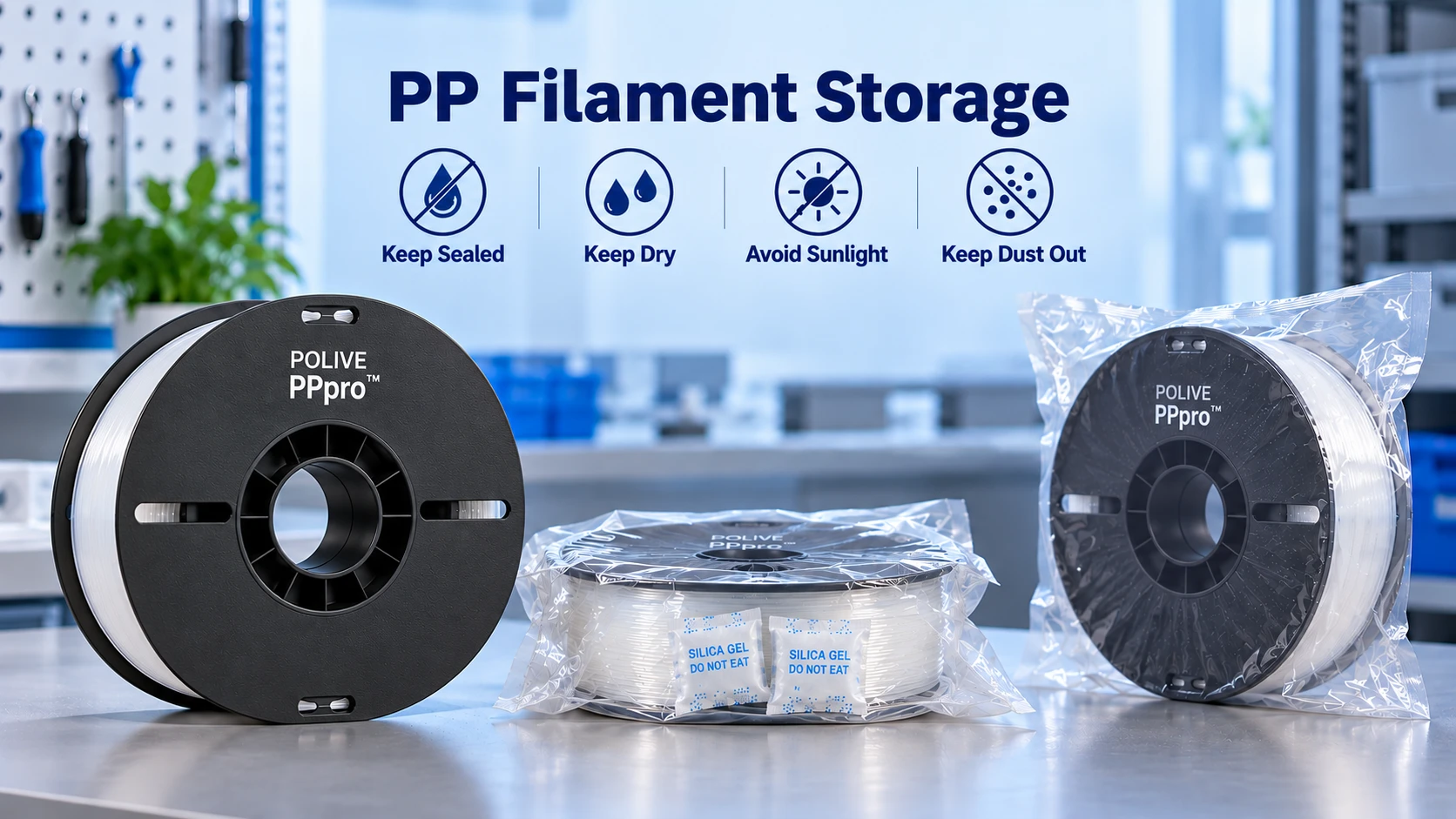
Under normal circumstances, using a resealable bag or airtight box together with desiccant, and placing it in a location at room temperature, dry, and away from light, can serve as an everyday storage method.
It should be noted thatThe specific moisture-absorption behavior of modified PP is also affected by its formulation, fillers, and additives, so actual storage and drying conditions should give priority to the product’s instructions.
PP’s Moisture-Absorption Characteristics
PP is a polyolefin with low water absorption, so it generally does not, like nylon, easily develop obvious moisture-related problems during printing from absorbing significant amounts of water.
This is also one of the reasons PP is relatively easy to manage as a 3D printing material.
However,low moisture absorption does not mean the storage environment can be completely ignored.
1. The filament surface can still become contaminated
During storage and use, the following may adhere to the filament surface:
- Dust
- Oil stains
- Residue from hands
- Other contaminants in the air
These contaminants do not necessarily come from the material itself, but they may affect the extrusion process, the surface cleanliness of the printed part, and feeding stability.
2. Modified formulations may change moisture-absorption behavior
Ordinary PP and modified PP do not necessarily have exactly the same moisture-absorption behavior.
The fillers, additives, or other formulation components used in modified PP may all affect the material’s actual performance.
Therefore, if you are using a specific brand of PP filament,you should follow that product’s technical documentation and drying recommendations.
3. Bubbles during high-temperature extrusion are not necessarily caused by moisture
If bubbles, abnormal sounds, or surface defects appear during printing, you should not directly conclude that the “filament has absorbed water.”
You should also check:
- Nozzle temperature
- Extrusion flow
- Print speed
- Whether the filament surface is contaminated
- Hot-end condition
- Whether the filament itself has any abnormalities
For low-moisture-absorption materials like PP,first do a small-scale test print, then decide whether drying is needed, which is usually more reasonable than directly drying at high temperature.
Does PP Filament Need Drying?
For PP filament that is stored normally and shows no obvious signs of moisture absorption, it is usually unnecessary to perform frequent high-temperature drying as with high-moisture-absorption materials.
If the filament has been exposed to a humid environment for a long time, or if abnormal bubbles or unstable extrusion occur during printing, you may consider a low-temperature drying test.
Here it needs to be emphasized:
“Needs drying” and “can be dried at high temperature” are two different matters.
PP filament drying should prioritize the material’s actual condition and product instructions, rather than simply raising the temperature.
How to Dry PP Filament?
If you confirm the filament needs drying, it is recommended to followlower temperature, sufficient time, and avoiding spool deformationas a principle.
1. Use a drying oven
If the product manufacturer provides clear drying parameters, you should give priority to following the manufacturer’s recommendations.
For specific PPpro⢠products, if verified data is not yet available, it is not recommended to directly present a particular temperature as a fixed “official drying temperature” on the website.
Therefore,The specific drying parameters for PPpro⢠should be added after internal testing is completed.
2. Use a food dehydrator
A food dehydrator can serve as a low-temperature drying device, but you need to pay attention to the actual temperature.
The displayed temperature of different devices and the actual temperature around the spool may differ, so do not rely only on the numbers shown on the panel.
3. Avoid direct sunlight and high-temperature baking
It is not recommended to directly use excessively high temperatures in order to achieve “thorough drying.”
Excessively high temperatures may cause the filament to soften, the spool to deform, or even problems such as interlayer adhesion.
For filament,maintaining the filament’s geometry and feeding stability is equally important.
4. Seal promptly after drying
After drying is complete, it is not recommended to leave the filament exposed to air for a long time.
A more reasonable approach is:
Dry â Cool â Place in resealable bag/airtight box â Add desiccant â Seal for storage
This reduces the chance of the filament being exposed to the environment for a long time again.
How to Store PP Filament in Everyday Use?
For everyday use, a simple and stable storage method is often more important than a complex handling process.
Sealed storage
You can use:
- Resealable bags
- Vacuum bags
- Airtight storage boxes
Store with an appropriate amount of desiccant.
If using vacuum bags, be careful not to subject the spool to unnecessary mechanical compression from over-vacuuming.
Room temperature and away from light
Filament should be stored as much as possible in:
- A dry environment
- A location with relatively stable temperature
- A location avoiding direct sunlight
- A location away from heaters and other continuous heat sources
In particular, do not keep the spool in a high-temperature environment for a long time.
Mark the opening date
If using multiple spools of filament at the same time, you can record on the packaging:
Opening date / Material type / Color / Batch
This makes it easier to track the usage of different spools.
Dust prevention during printing
If the filament needs to be exposed near the printer for a long time, consider using simple dust-prevention measures to reduce dust entering the feeding path.
For long-term printing, keeping the feeding path and printing environment clean is equally important.
Store promptly after use
If printing ends for the day, it is recommended to put the remaining filament back into the sealed container.
For low-moisture-absorption materials like PP,good everyday sealing habits are usually more practical than frequent drying treatments.
What to Do If the Filament Gets Damp?
If you suspect the PP filament has been affected by moisture, you can first avoid proceeding directly to formal printing.
It is recommended to troubleshoot in the following order:
Step 1: Check the filament appearance
Observe whether the following exist:
- Surface contamination
- Obvious deformation
- Filament sticking to each other
- Abnormal filament diameter
- Severe spool deformation
Step 2: Perform a small-scale test
First print a simple test part and observe:
- Whether extrusion is continuous
- Whether abnormal bubbles appear on the surface
- Whether obvious extrusion instability exists
- Whether stringing is abnormal
Step 3: Perform low-temperature drying if necessary
If drying is confirmed to be needed, it should be processed according to the parameters provided by the material supplier.
If the product has no clear drying data, it is not recommended to set an excessively high temperature on your own.
Step 4: Re-test
After drying is complete, perform the small-scale test again.
If the printing state returns to stable, continue with formal printing.
What to Do If the Filament Is Contaminated by Oil?
Oil contamination and moisture are different problems.
If the filament surface is obviously contaminated, you can first gently wipe it with a clean, soft lint-free cloth.
Whether a specific cleaning agent is suitable for a certain PP formulation needs to be confirmed according to the material’s instructions; it is not recommended to directly soak the entire spool of filament in liquid.
If the contamination is severe, or the filament has already clearly affected printing stability, a more practical approach may be to directly replace the filament.
What to Do If the Spool Deforms or Sticks?
If the filament develops the following due to high-temperature storage:
- Spool deformation
- Filament sticking together
- Filament obviously flattened
- Difficulty feeding
It is not recommended to force it into the extruder.
Deformed filament may cause increased feeding resistance and unstable extrusion, and in severe cases may even cause filament jamming or other mechanical problems.
Therefore,High temperatures in the storage environment also deserve attention.
Are Bubbles During Printing Definitely Caused by Moisture?
Not necessarily.
This is a misconception that easily arises during PP printing troubleshooting.
If bubbles or abnormal sounds are found during printing, you can check at the same time:
| Possible cause | Recommended check |
| Filament condition | Whether exposed long-term, whether contaminated |
| Nozzle temperature | Whether too low or too high |
| Print speed | Whether it exceeds the stable extrusion range |
| Flow rate | Whether extrusion abnormalities exist |
| Hot end | Whether heating is stable |
| Nozzle | Whether blockage or contamination exists |
Only after ruling out other factors can you more confidently determine whether the problem is related to the filament’s condition.
A Simple PP Filament Storage Plan
If you want to adopt a simple, low-cost storage method, you can use:
Resealable bag/airtight box + desiccant + room temperature and away from light
For everyday use, this already covers most basic needs.
If the filament will not be used for a long time, you should pay even more attention to sealing and the environmental temperature.
If you need to print after reopening, you can first do a small test section rather than using the entire spool for a large print directly.
Summary
PP itself has low moisture absorption, so the storage focus for PP filament is usually:
- Dust prevention
- Pollution prevention
- Avoiding high temperature
- Proper sealing
- Maintaining a stable storage environment
If the filament shows no obvious signs of moisture absorption, there is no need for frequent high-temperature drying just to be “safe.”
If you suspect the filament’s condition is abnormal, you can first do a small-scale test, then decide whether drying treatment is needed.
For POLIVE PPpro™, going forward, if dedicated drying tests are completed, verified drying temperatures, times, and printing-performance data before and after drying can be further added. This is more informative than directly providing unverified fixed parameters.
Does PP Filament Need Drying?
PP has low moisture absorption, so it usually does not need drying before every print the way nylon does. Bubbles are not necessarily a sign of moisture either — check nozzle residue, excessive temperature and oil on the filament surface first.
What If the Filament Really Is Damp or Oily?
If it is damp, dry it at a low temperature and try again; for oil, wipe the filament surface with a clean cloth and keep the oil out of the hot end. If the spool is deformed or the filament is tangled, straighten it out before loading to avoid intermittent extrusion.
What Is the Easiest Everyday Storage Solution?
Keep it dry, away from light, and protected from dust and oil; seal it back in the original packaging or a sealed bag after use, with desiccant for extra safety. What matters is a clean environment, not elaborate constant-humidity equipment.
Does Modified PP Absorb Moisture Differently?
A modified formulation can change moisture behaviour, so do not copy pure-PP experience verbatim. Follow the manufacturer's storage advice for the specific filament; for everyday use with PPpro™, the routine above is enough.
Related Reading
- Does PP Absorb Water? Moisture Absorption of PP Filament and Prints
- What to Do When PP Printing Jams? Troubleshooting Steps for Poor Extrusion
- How to Choose 3D Printing Materials? Understanding Key Indicators on the Spec Sheet
- How to Configure PP 3D Printing Settings? PPpro™ Parameter Guide